Showing posts with label Social Media. Show all posts

Thursday, October 20, 2011

Tapping Internet Memes for Viral Videos*

(*at least I hope it goes viral!)


For the past few months I have been contracting at Alpha Software Corporation. In business since 1982, Alpha is a real bootstrap organization with lean, highly productive permanent staff, and they plug in contractors and service providers to add capacity.

Well, the bootstrapping must have rubbed off on me a little bit because while I was working on a landing page optimization project, I found myself playing around with a meme video, hoping it would go viral.

Why a Meme?
When we first started talking about viral videos, someone tossed around some ideas about funny and intriguing video concepts. But I think it is really hard to come up with something funny enough to go viral. And then it is also difficult and costly to get it produced with high enough quality to pay off the concept (and also to reflect positively on your brand). And finally, once you get it produced you need to get enough exposure to feed the chain reaction that makes it go viral. If you mess up on any of those variables, then you've wasted a lot of time and money on a flop.

The rules are different when you are talking about Internet memes:
  • Internet memes are already funny. They are, by definition, a running joke.
  • Internet memes typically have low production value and can be "hacked" with technology that is free to download or already on your computer.
  • Internet memes already have an audience because people are familiar with previous versions of them.
And so I wound up creating this viral (I hope) video "MS Access 2010 Dog Tease." It was surprisingly easy to create, here are the steps:

1. Find a meme that fits your brand and your message
After a little bit of brainstorming, we decided to do a version of the Dog Tease meme. The original Ultimate Dog Tease video is a viral blockbuster with over 65 million views on YouTube. If you search YouTube for "dog tease" you will see it has been modified, copied, and responded to hundreds of times for comic and promotional effect.

Here's why the Dog Tease meme made sense for Alpha Software:
  • Alpha Software Corporation is dog crazy. Specifically, Richard Rabins, the Co-Chairman, is dog crazy. He always has been. When I worked there back in the '90s, Richard instituted a policy where any employee could bring their dog to work at any time (the woman I shared an office with had a 140 lb. English Mastiff named Jagger she would regularly bring to work). More evidence: earlier this year, Alpha issued a press release announcing that Richard's dog Clifton had joined Alpha as "Director of Sniff-Testing."

  • The theme of the Dog Tease meme is disappointment. The dog's hopes get built up when the man starts talking about food, only to be dashed when the man announces that he ate the food himself, and then gave it to the cat. Alpha's brand is all about picking up off the floor the disappointed customers of other database software. So we did a version of the dog tease video that starts with a disappointed dog but then gives him renewed hope.
When we started discussing using a meme, Richard suggested the Dog Tease meme, and it was a perfect choice.

2. Get the source video
Sure, you can find the video on YouTube. But you need to get the video file *onto your hard drive* if you want to modify it and then output your own video. Mashable published a list of applications you can use to download YouTube videos to your computer. I ended up using Easy YouTube Video Downloader, which is a plug-in for FireFox that adds a button to the YouTube interface and allows you to download any YouTube video as a MP4 file, it couldn't have been easier. Please note this disclaimer from the Mashable article:

...downloading personal copies of YouTube videos is not supported by the YouTube Terms of Service, which states: "You may access User Submissions for your information and personal use solely as intended through the provided functionality of the YouTube Website. You shall not copy or download any User Submission unless you see a "download" or similar link displayed by YouTube on the YouTube Website for that User Submission."

3. Script it
The hardest part of the whole project was developing the script for the meme video. It wasn't difficult, just tedious. Since you are going to re-use the existing video and just replace the audio, the first thing you need to do is map out the script of the original video, and then fit your revised script into the same cadence so the video and your new audio match up and look natural. You can see from the screen shot below the way I used MS Excel to map out the original script on a timeline and then draft the replacement script to fit.


You can download the spreadsheet document I used for scripting to make it easy if you decide to do a video of your own.

4. Produce it
This is surprisingly easy, even for someone like me with next to zero video production experience. The means for doing it are readily available, here's what I used:
  • The standard microphone from my laptop computer
  • Audacity, an opensource freeware audio recording and processing software
  • Microsoft Windows Live Movie Maker (which ships with Windows 7) for mixing the new audio track to the video and outputting the new video
There was one thing I was unable to do with Microsoft Windows Live Movie Maker. The original dog tease video was only one minute and six seconds long. That's not enough time to get much of a marketing message across to your audience. So I came up with the idea that we could double the length of the video simply by running it forward and then in reverse, like a mirror image. Since the video footage is just a dog shifting around, wagging its tail, and making funny faces, it actually looks pretty natural when you run the footage backwards, nobody who I've shown it to has even noticed it until I point it out. Microsoft Windows Live Movie Maker does not support the ability to run your video in reverse, so I had a friend with Final Cut Pro on the Mac who did it for me in about 30 seconds. Here's the doubled video file if you want it.
  • First I recorded the dog's voiceover and dropped the audio clips into Microsoft Live MovieMaker. Audacity lets you easily record the audio, trim dead spots from the beginning and end of your recording and smooth over any hot spots, and then save them as .WAV files. MovieMaker lets you import audio, position it on the timeline just right, and mix it with the original video. Record each vocal outburst as a separate file, so you will end up with around 15 little audio files for the dog.

  • Next I output the new video with just the dog's voiceover. Why did I do this? Because MovieMaker does not have multi-track capabilities for audio, so any overlapping of the dog's voiceover with the man's voiceover could not be accommodated. So I output the video with just the dog's voiceover and then I started a new MovieMaker project with that interim video to add the man's voiceover.

  • Then I recorded the man's voicover and dropped the audio clips into MovieMaker. (Again, I recorded each vocal outburst as a separate file and I had around 15 little .WAV files for the man's voiceover.)
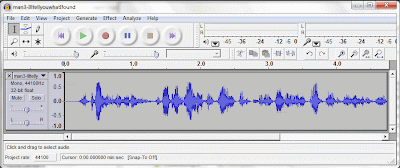

    I imported them into MovieMaker and positioned them just right on the timeline.
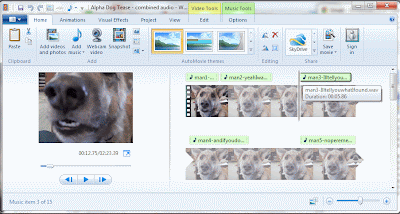


  • I added credits and a call-to-action (CTA) to the end. MovieMaker makes it easy to add title screens, credits, and captions to your videos, and to use basic animation techniques like wipes, fades, scrolls, etc. The CTA is to download the Alpha Five free trial.

  • Finally, I output the finished video. When outputting the video from MovieMaker, I just used the recommended settings for the output file and I wound up with about a 40MB .WMV file and the A/V quality is totally fine.

5. Post it
This is pretty straightforward. We posted it on YouTube and Vimeo, and might post it on a few other video sharing sites.

However, before you upload the video, take some time to think about how you can maximize the SEO value of your video. For example, when we first posted the dog tease video, we named it "Alpha Five Dog Tease." That seemed logical, we didn't even really think about it. But then I got the idea that we should post it as "MS Access 2010 Dog Tease," and that made a huge difference in the number of people who would be able to find it through Google and YouTube searches. I also developed a strong 500-character description for the video that is chocked full of keywords, and added some important search tags. Solid SEO discipline.

So did changing the name from "Alpha Five Dog Tease" to "MS Access 2010 Dog Tease" make a big difference? Well, I can't quantify it. But after I made the change I ran a YouTube search on "MS Office 2010" and I was quite pleased to see this:


Notice the little thumbnail image of our Dog Tease video about half way down on page 3. I know that if I was searching and was presented with this page of thumbnail images, amid the sea of images of screen shots of programming dialog boxes I would definitely click on the one thumbnail image featuring the cute little face of a doggie!

Finally, if you are revising somebody else's video for your meme, then you should give them due credit for providing the original material. This will preserve good will and will make it less likely that they will flag it as a copyright violation. I gave credit to IcePrincessXXIV (the person who posted the original video of the dog) in both the video credits and the YouTube description.

6. Promote it
You've already got SEO working for you thanks to the care you took in naming/describing/tagging it when you posted it. Now you need to push some messages out that drive traffic to the video:
  • Email/E-newsletter
  • LinkedIn
  • Twitter
  • Facebook
  • Blog
  • Website
  • Forums
I found a good blog post about how to promote your viral video. Suffice it to say that it is not easy to get your video to go viral! I am going to do a separate blog post about all the promotional plan I devised to get the video to go viral.

Try to encourage visitors to interact with it: give it a thumbs up rating, make it a favorite, leave a comment about what they like the best... and (most importantly) share it via email, Facebook, LinkedIn, Twitter, etc.! All these things increase the viral exposure of the video and makes it rise to the top of search rankings.

You can also push the interaction even further: challenge your audience to make their own versions of it. When we announced the dog tease video on the Alpha Software blog, we linked the script and the video file to the blog article so readers could play around for themselves.

Create a Dog Tease video of your own and post it as a response on YouTube. It's easy and fun to create a Dog Tease video...
  • Step-by-step instructions can be found here.
  • The video source file can be downloaded here.
  • The script template can be downloaded here.
  • To post your own video as a "video response," go to the MS Access 2010 Dog Tease video on YouTube, click your cursor into the "comments" box and you will see a control appear on the side that says "create a video response", which will allow you to upload your video.
We hope to see some response videos posted to YouTube!

Wednesday, April 27, 2011

Facebook Doesn't Work For VARs, But Here Are 4 Social Media Marketing Techniques That Do


There is a lot of discussion about how Social Media Marketing might fit into Channel Marketing (and into B-to-B Marketing in general). I recently wrote an article about how I thought Social Media had zero significant advantages as a tool for Vendors to communicate with Channel Partners. However, I do not think it is fair to throw out the baby with the bathwater.

Here is a run-down of 5 social media tactics that VARs might already be juggling, or might be considering including in their marketing plans. One is a loser, but 4 of them have real potential and can positively impact your marketing activities.

Facebook: A Social Media Marketing Technique That Does Not Work For VARs

What it's good for:
Distracting you from marketing work that will produce real results; giving Social Media a bad name in the B-to-B marketing world; causing your colleagues and managers to doubt the value of marketing.

After 3 years of hard work at PTC we secured just over 3000 "fans" of PTC's Pro/ENGINEER - Did You Know Facebook page [EDITOR'S NOTE: it is now October 2011 and I see this link is now broken; evidently PTC took my advice (below) and abandoned this fan page]. That's not bad, and I want to acknowledge the terrific work that went into building out the strategy, content and audience. For the first year it was very difficult to get fans to post or comment or upload. But the page manager soldiered on, posting great content. Over the years she has refined her content strategy and writing style (writing for Social Media is a tricky art), and the community matured, and now there is a decent amount of interaction from the fans.


But I would estimate that 1/4th to 1/3rd of those 3000 fans are PTC employees or channel partners. Also, consider that in about the same amount of time my local watering hole, Trina's Starlight Lounge, has secured 2200 fans. PTC is a global brand with millions of users, while Trina's is a neighborhood bar serving PBR and a daily hotdog special. This illustrates just how difficult it is to build a B-to-B presence on Facebook. And I dare say that Trina's can probably claim more sales revenue as a result of their Facebook campaign (I have gone in for their "dog of the day" special at least twice after seeing it on Facebook, and that alone is probably enough to tip the scale).

Several PTC VARs have created Facebook pages. For example, 3 HTI, a PTC Platinum VAR, posts status updates and content once per week or so. They leverage a lot of PTC content on PTC's YouTube channel, website, and blogs. But after 2 years they have only 100 fans. Most of them are employees of 3 HTI or PTC, and there is very little interaction with the content 3 HTI is posting on Facebook.

People use Facebook for fun. It has been used successfully by some consumer brands. But it is just not gaining widespread traction in the B-to-B world, despite a ton of hard work and a ton of hype. By any conventional standard of measurement (brand impressions, leads, sales, etc.), marketing on Facebook -- for both Vendors and VARs -- is a failure. There are easier and cheaper ways to conduct marketing to larger audiences with better results.

Dos and Don'ts:
  • DO turn your Facebook page over to your HR department. Maybe it has some value as an employee morale building or recruiting tool. But you should detach it from your Marketing work because people love to take pot-shots at Marketing and your Facebook page represents a very public target if they are trying to build a case that you are not pulling your weight.
  • DON'T spend more than 5 minutes per week on it. In a world where the biggest problem for VAR marketing is lack of capacity, Facebook is something you should hack off your marketing to-do list.

4 Social Media Marketing Techniques That Do Work for VARs:

#1. Community Site

What it's good for: Building the vendor brand; building your VAR brand; building your personal brand; identifying industry trends & topics; promoting lead generation offers; identifying sales opportunities.

The best Social Media Marketing strategy a vendor can undertake to the benefit of a Channel Program is building a social media customer community. Vendors should create a social media community for customers to network, share successes, solve problems, and learn about relevant product and industry topics. VARs should be a part of this community. They should comment, solve problems, post interesting questions, and show off their customer success stories. All the while, VARs will be building their brand as subject matter experts. It's essential that VARs keep the selling to a minimum, but sales opportunities will surface as you build your brand and participate as a good community member.

You can build a community with LinkedIn groups, discussion boards, or community building platforms like Jive.

In June 2010, PTC launched a customer community called "PlanetPTC" (http://communities.ptc.com). It was created using Jive and it offers users the ability to create an account and access features including discussion forums, blogs, wikis, news feeds, file sharing, groups, content rating, commenting, tagging and friending. Forrester Research categorizes PlanetPTC as an "energizing" community and it was a finalist in Forrester's 2010 Groundswell Awards. (Full disclosure: Forrester performed a paid consulting assignment to help PTC plan and implement the community.)


To date, there has been no programmatic outreach from PTC to get the VARs to join PlanetPTC. PTC wanted to launch the community to customers first to prevent it from being overrun by VARs at the outset. Smart move. You don't get a second chance to make a first impression and it was important to nurture customer engagement to start with. The time is right now (or perhaps it is past due) for PTC to push the VARs to join and participate in the community.

Dos and Don'ts:
  • DO rely on the *Vendor* to create this community. Building and maintaining a customer community is a lot of work and it is best left to the Vendor, not the VAR. One year before PlanetPTC was launched, one of our biggest VARs attempted to launch their own community website. "TriStar Commons," launched in 2009, was an ambitious venture that ultimately failed because TriStar could not manage the demands of maintaining an editorial calendar and they could not compel customers to join or participate. The Vendor will have more resources and better ability to execute successfully than the VAR.
  • DON'T be too promotional. Yes, VARs can use the site to promote offers and pursue sales opportunities. But it should be balanced with altruistic participation. Once your reputation as a member in good standing and your subject-matter expertise is established you will see sales opportunities emerge.


#2. LinkedIn Groups

What it's good for: Building your VAR brand; building your personal brand; identifying industry trends & topics; promoting lead generation offers; identifying sales opportunities.

I mentioned above that you could create a community site using LinkedIn groups. It would be a pretty stripped-down community site, really just a discussion forum, because LinkedIn does not enable users to upload/download items. So you would need to post any rich content (videos, PDFs, etc.) on other platforms like YouTube or your corporate website or Google Docs or Scribd or your blog. PTC did this for the Creo Elements/Pro Users group on LinkedIn. The Creo Elements/Pro Users group is managed by a PTC marketing staffer, it has around 2000 members, rich content is hosted elsewhere as described above, and there are interesting conversations going on about using CAD software. Again, this is a user community effort and it is best for the Vendor to take ownership of establishing the group, not the VAR (though the VARs can and should be active group members).

A great way for the VARs to use LinkedIn is to join LinkedIn groups where your customers and prospects are congregating. For PTC VARs, joining the Creo Elements/Pro Users group mentioned above is a no-brainer, and many have done that. There are other groups not managed by PTC that should be on their radar, too:


It is really easy to find groups like this using the LinkedIn search engine. The VARs should definitely join the ones hosted by their vendor. But it is equally (or more) valuable to join the ones that are not officially owned by the vendor because that is where you will see users of competitive products voicing their frustrations.

Dos and Don'ts:
  • DO sign up for weekly digest emails. This is a setting you choose when you sign up for a group. That way you don't have to hang out in the group all day waiting for something interesting to happen. Also, keep the weekly digest emails in a folder and you will create an archive of group activity so you can use your email's search functionality to research any group member you are interested in.
  • DO start slow with a "listening" exercise. Do not post any comments for the first week or so until you can get a flavor for the tone of the group.
  • DO participate in conversations that don't directly involve a sales opportunity. Establish a track record of being a good group member and a general subject matter expert.
  • DON'T be overly promotional. If you go in there like a shark you might be flagged as inappropriate by a member or kicked out by the group owner. Consider carefully the option of "replying privately" (via a one-on-one LinkedIn email with the group member) instead of posting a comment for all to see.
  • DON'T disguise your identity. Don't pretend you are not a VAR. If you try to hide your identity, sooner or later you will be found out and your credibility will be destroyed.


#3. VAR Blog


What it's good for: Building your VAR brand; promoting lead generation offers; improving Search Engine Optimization for your website.

Creating a VAR blog is an incredibly powerful marketing activity because it really gives you the ability to showcase the "Value Added" part of being a Reseller. A great example is the PLM blog that Stephen Porter writes for Zero Wait-State (VAR/agent for PTC and Oracle). Stephen is a very clever writer with a great voice for Social Media and a ton of industry experience.


Dos and Don'ts:
  • DO create an editorial calendar. You need to maintain a steady cadence of posts or your audience will lose interest. At least 1 post every-other week is a good place to start. Create a list of 12 topics on a white board. That's a 6-month editorial calendar. As you get into the swing of it, ideas will start popping into your head all the time and you can just add them to the list.
  • DO attach your blog to your website. This can be a massive boon to Search Engine Optimization. Hubspot is a great tool to consider if you are going to create a VAR blog, their tool set makes it easy for small businesses to publish blog content that is anchored in your keyword strategy and measurably improves SEO.
  • DO promote traffic to the blog. Make sure your blog is prominently featured in your website navigation. Promote blog posts using e-newsletter, email, Twitter, discussion groups, your company's email signature, etc.
  • DO reuse content that was created for other purposes. Content creation is a burden. So when you create content for other purposes, blog about it. For example, blog about the case study you just published, about the YouTube video you just posted, about the analyst report your Vendor just commissioned, about the trade show at which you just exhibited, etc.
  • DO respond to any comment quickly. Even if it is just to say "thanks for your comment" or "let me check on that and I will get back to you." Comments represent audience engagement, and that is very hard to come by, so treat them like they are delicate flowers that need to be nurtured.
  • DON'T get bogged down. Your posts don't all have to be long. You can post short ones that talk about an interesting point made in a white paper or analyst report or video or news item. Or just ask a provocative question and see if you can get an interesting conversation going with your followers. It is good to have variety.
  • DON'T go it alone. Share the burden of content creation with one or two other people in your organization. Make sure at least one of them is a technical expert and can field any technical questions and comments that are posted.


#4. Twitter

What it's good for: Establishing relationships with industry influencers; building your VAR brand; building your personal brand; identifying industry trends & topics; promoting lead generation offers.


Twitter is one of the hardest to understand forms of Social Media for newbies. But it is also probably the easiest one to get started with if you just stick your nose in there and do it. I suggest that you create a corporate Twitter account, plus a Twitter account for any individual at your company who is also blogging.

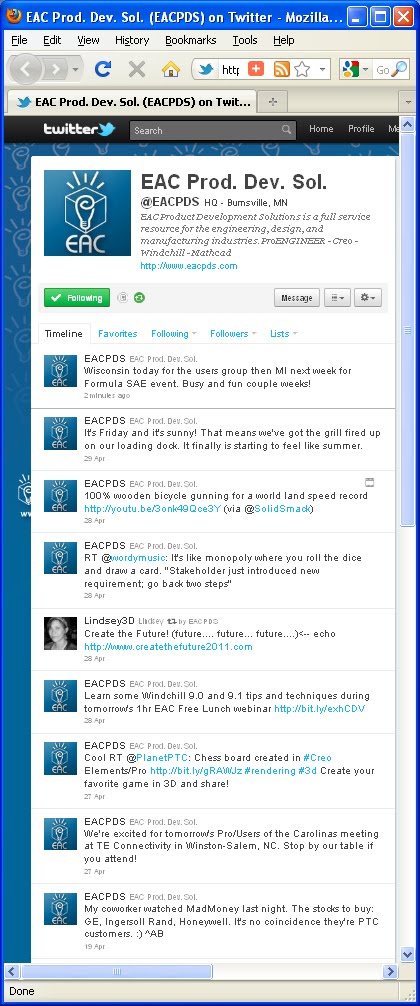
The great thing about Twitter is it does not require a lot of unique content creation. Look at how EAC Product Development Solutions builds a steady stream of interesting tweets simply by retweeting content from other sources (tweets from their vendor, news and articles from relevant editors, publications, and bloggers). And they also use Twitter as another medium to promote offers such as their webinars, seminars, and meetings of the local User Groups they support.

Single-Sourcing Solutions, a VAR who sells PTC's ArborText product, has a similar Twitter presence. And CEO Liz Fraley has also done a great job of building her own personal brand by blogging and tweeting (as well as tireless offline networking in the XML industry).

Dos and Don'ts:
  • DO start by following the editors of the magazines and bloggers that cover your industry. These are important inflencers you want to build relationships with. And they are being followed by your target audience.
  • DO start slow with a "listening" exercise. Twitter is difficult to understand at first, so give yourself some time to figure it out before you start tweeting.
  • DO retweet posts from the people you are following. It ingratiates you to them and helps you build relationships. Retweets are the currency of Twitter; if you retweet their stuff then they are more likely to listen to you and perhaps retweet your stuff.
  • DO set goals about your frequency of tweets. Try something like "I want to retweet something interesting 2 times per week, and I want to tweet about something original once per week." Dial it up or down based on your comfort level and results.
  • DO rebroadcast your Twitter feed. You can register your Twitter handle on your LinkedIn profile so your Twitter posts will be rebroadcast as LinkedIn status updates. You can use plug-ins and apps so your Twitter feed will be shown in a widget on your blog and your website. These steps will give your tweets more exposure even to people who do not use Twitter.
  • DON'T follow too many people all at once. The volume of tweets will be unmanageable.
  • DON'T tweet about personal stuff. Leave that for Facebook, or a separate personal Twitter account. As Heather Margolis says in her excellent Channel Maven blog: "Twitter is not just a place for people to talk about what they had for breakfast or when they are going to the grocery store. If that’s what you tweet about I can assure you, I’m not following you." If more than 5% of your Tweets are personal then something is wrong.
So in conclusion...

Yes, there is a lot of hype surrounding Social Media Marketing in the B-to-B Channel. But I think these 4 tactics are worth the time of VAR Marketers and can produce real benefits.

What do you think? Do you have experience (positive or negative) with any of these tactics? Please tell me about it in the comments section below.

Monday, April 25, 2011

Can You Use Social Media to Communicate With Your Channel Partners?


I recently posted an answer to a question on LinkedIn regarding using Social Media with Channel Partners:

Question: "What is the most cost effective and sustainable way to engage with channel partners on a social media platform?"

My Answer: "...You can encourage open discussions among your channel partners about your channel program by creating a LinkedIn Group for your Channel program. For the "Access" setting you should select "Request To Join" so you can be the gate keeper for membership, and then click "Create a Members-Only Group." Put together an editorial calendar of topics you want to discuss. Come up with a reward system to encourage engagement (could be financial incentives like MDF, or simply award logoed gear each week to the ones who are top influencers and key contributors)..."

The Problem Is, It Won't Really Work.
Well, to be more precise, you *can* create a LinkedIn Group as described above... And you *can* incentive-ize VAR engagement in the Group... But you will *probably not be successful* in getting your Channel Partners to openly discuss topics and share best practices using this Group, or any other social media mechanism.

The reason is because most Channel programs pit resellers against one another by giving them overlapping sales territories. At PTC we often had 3 or 4 different VARs covering the same geography and the same market. They would compete brutally for the same prospects and customers, sometimes competing in a price war that compelled one VAR to finally win the sale at a negative margin. They would also steal each other's sales reps and AEs. They would trash-talk and get in fist-fights at the annual sales kickoff meetings (true story).

It is very difficult to eliminate this sort of VAR vs. VAR competition. We minimized it to some extent by using a deal registration system and account protection rules. But it is nearly impossible to eliminate it entirely. And in fact it is not really desirable to eliminate VAR vs. VAR competition completely because the right amount of competition keeps them working hard to cover the territory and satisfy your customers.

Social Media is a great tool for bringing together a community of like-minded people so they can spontaneously engage with one another (post questions and answers, etc.) for their mutual benefit. It is not a good medium for organizations who are in direct competition with one another, because it would be foolish for any community-member to share knowledge that would help their competitor to become stronger.

A Better Solution:
Better solutions for communicating effectively with your channel are tried and true:

1. Weekly Channel Ecosystem Webcast
Share important program and product information. Enable Q&A. Post the recordings in a searchable archive on the Partner Portal. Make it mandatory to attend each week, but optional to participate in the Q&A.

2. Partner Portal
Post product information, recorded webcasts, marketing campaigns, etc. for review or download in a password-protected intranet for the VARs.

3. Annual VAR Advisory Council Meeting
Invite your most influential VARs from each geography to a 2- or 3-day summit to discuss their interaction with all departments and business functions within your Channel organization. VAR principals can typically put aside their differences for this once-per-year meeting and identify what about your Channel Program is working and what needs to be improved in each major geography.

Social Media is great, but it is not the answer for everything.

Do you have a different opinion or experience? Please share it with me in the comments section below!